
007
Skill Lab
Beginner
LED Dimming
A digital pin only knows on and off. PWM makes it look like it knows dim and bright.
Mission: fade instead of blink
Blinking switches an LED fully on and fully off. Dimming uses PWM: the pin switches very quickly, and your eyes average the pulses into brightness.
You will reuse the external LED circuit, then change only the code.
PWM in one picture
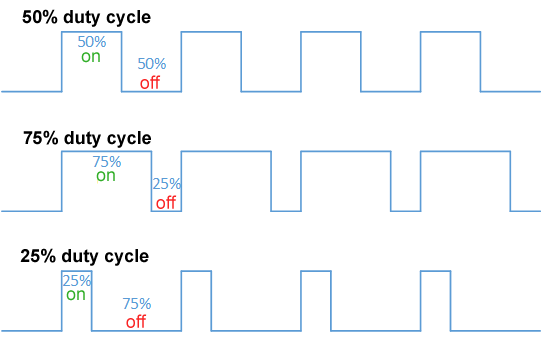
Duty cycle is the important knob. A low duty cycle means short on-pulses and a dim LED. A high duty cycle means long on-pulses and a bright LED.
Frequency is how often the pulse pattern repeats. For visible LEDs, 1000 Hz is fast enough that the LED appears steady instead of flickery.
PWM-capable pins
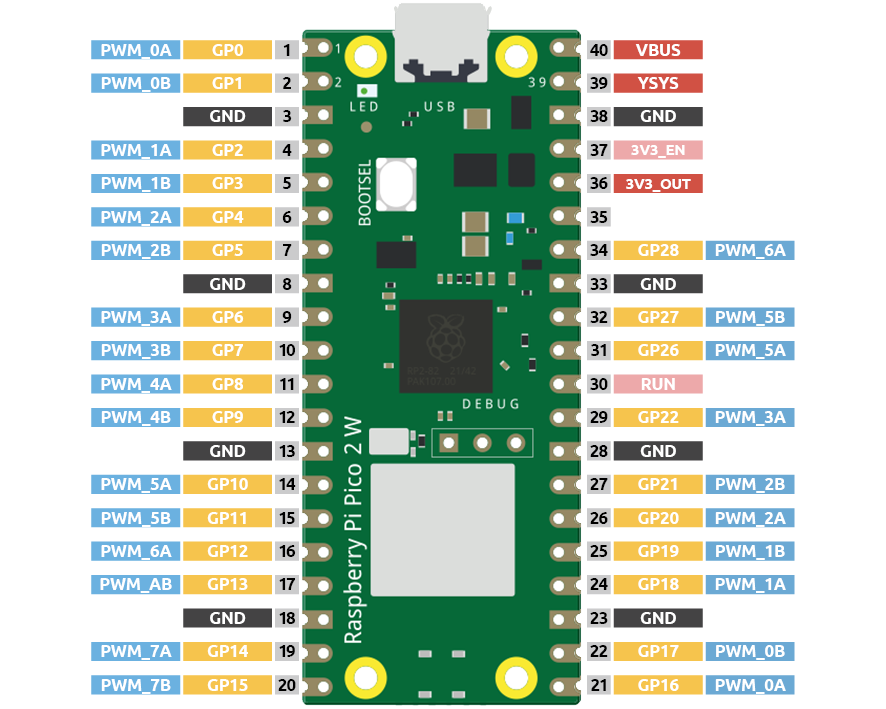
The Pico can create PWM on many GPIO pins. This lesson stays on GP15 so the external LED wiring remains familiar.
Later, shared PWM slices can matter when two pins need different frequencies. For now, one LED on one PWM pin keeps the idea clean.
Reuse the LED circuit
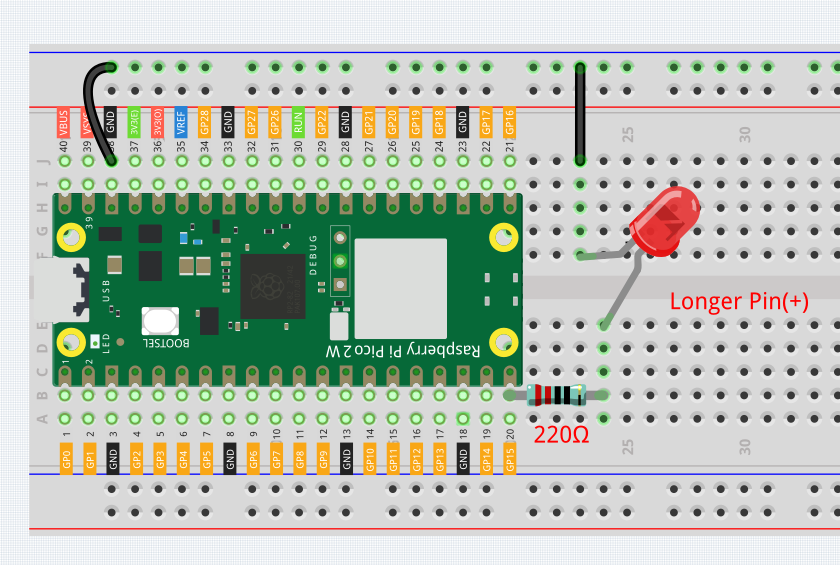
Use the same GP15, resistor, LED, and GND path from the external LED lesson.
Do not remove the resistor just because the LED is dimming. PWM changes timing, not the need for current limiting.
Code: smooth fade loop
from machine import Pin, PWM
from time import sleep

led = PWM(Pin(15))
led.freq(1000)

try:
    while True:
        for duty in range(0, 65536, 1024):
            led.duty_u16(duty)
            sleep(0.01)

        for duty in range(65535, -1, -1024):
            led.duty_u16(duty)
            sleep(0.01)
finally:
    led.duty_u16(0)
    led.deinit()
How the PWM code works
PWM(Pin(15)) turns GP15 into a PWM output object.
led.freq(1000) sets the pulse frequency to 1000 cycles per second.
MicroPython duty_u16 uses a 16-bit number. 0 means always off, 65535 means almost always on, and values between those extremes create different brightness levels.
range(0, 65536, 1024) walks upward in chunks instead of jumping straight to full brightness.
The second loop counts down, creating the fade-out.
finally runs when you stop the program from Thonny. It turns the LED off and releases the PWM peripheral.
Debug checklist
If the LED only blinks or stays solid:
- Confirm the code uses PWM(Pin(15)), not Pin(15, Pin.OUT).
- Confirm duty_u16 is spelled with the underscore.
- Check that the external LED circuit still works with the simple blink code.
- Try a larger sleep value like 0.03 to make the fade easier to see.
If the LED flickers visibly, try a higher frequency like 2000. If it is too bright, reduce the maximum duty value in the loop.
Remix: breathe pattern
Make the fade feel like a breathing status light:
- Use a smaller step like 512 for smoother changes.
- Add sleep(0.4) at full brightness.
- Add sleep(0.8) after turning fully off.
Small timing changes can make the same circuit feel calm, urgent, or playful.
Checkpoint
Mark complete when:
- Your external LED fades up and down.
- You can explain duty cycle without using the word magic.
- You changed either the step size, frequency, or sleep timing and observed the result.
- You can explain why the resistor is still required.
Private Dev Log
Write a short build note:
1. PWM makes brightness by...
2. My best fade setting was...
3. A project that needs dimming is...
References
Primary build reference:
https://docs.sunfounder.com/projects/pico-2w-kit/en/latest/pyproject/py_fade.html
MicroPython API reference:
https://docs.micropython.org/en/latest/library/machine.PWM.html